DM100 problems

zhariks

New member
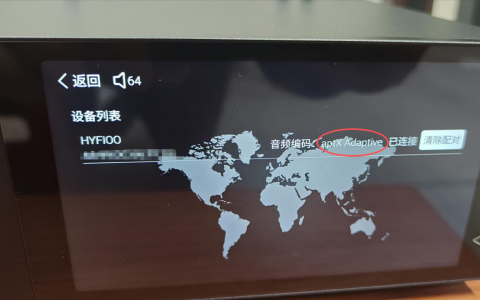
1. I've bought DM100 becaude of LDAC support. Now I try to connect my headphones, and it connects only at SBC. That is very low. I need at list aptx.
2. There is now possibility to add folder to playlist. I'm used to sort my music by folders, and I'd like to add it by folders. FIIO support that option, DM100 - doesn't. Could you add that option.
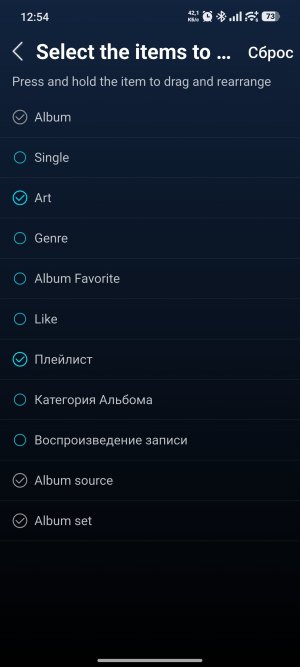
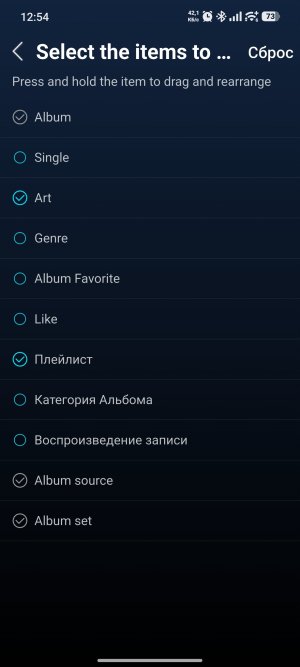
2. It is possible to remove unused categories in mobile app, but there is now such option in DM100 interface. Please add such option - it is a standart in all players.
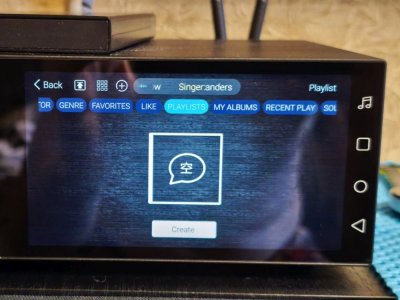
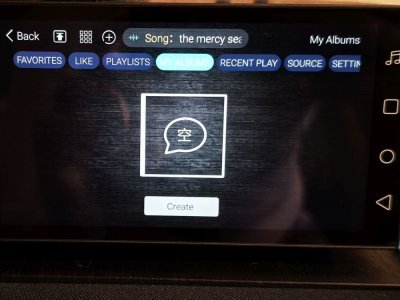
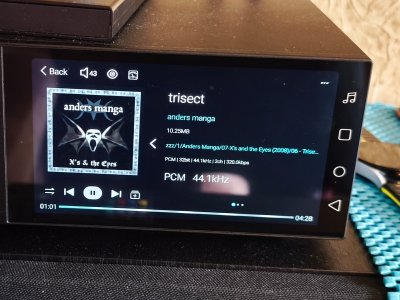
3. I use English interface, but there are some Chineese words, and incorrect translations in some places.
4. There is an option to choose functions for FN button. But I don't understand, where this button is located
 
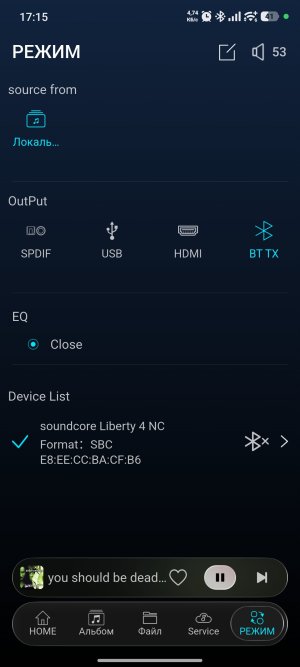
Another problem is with headphones connection. Dm100 connects headphones automatically only a few seconds after startup. If I turn on my headphones after DM100 started, they will not connect automatically. I have to go to "modes" each time, and connect them manually. It is not normal behaviour!
For example, when I turn on headphones or bluetooth speaker, they connect to my mobile phone automatically
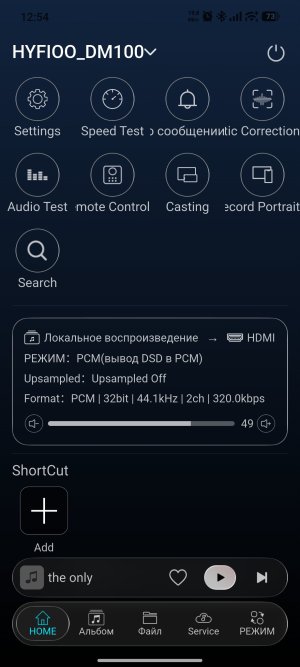
Mobile app looks awfull. There is no option to choose language in it, so it starts in my system languge (Russian). But translation is sometimes not correct, sometimes texts are trunced or overlap each other. I understand, that Russian is not main language for you, and I agree to use English. But I don't have such option in the app. Please add it
 
1. I've bought DM100 becaude of LDAC support. Now I try to connect my headphones, and it connects only at SBC. That is very low. I need at list aptx.
2. There is now possibility to add folder to playlist. I'm used to sort my music by folders, and I'd like to add it by folders. FIIO support that option, DM100 - doesn't. Could you add that option.
2. It is possible to remove unused categories in mobile app, but there is now such option in DM100 interface. Please add such option - it is a standart in all players.
3. I use English interface, but there are some Chineese words, and incorrect translations in some places.
4. There is an option to choose functions for FN button. But I don't understand, where this button is located
1. LDAC is supported for receiving, and APTX is supported for transmitting, provided the backend supports it.

2. You can add playlists through the album library; folders are used solely for file management.

3. What do you mean by “deleting unused categories”? If possible, please provide a screenshot or video.

4. If you find any Chinese terms on the English pages, please send us a screenshot, and we will fix it as soon as possible.

5. The FN custom buttons are located on the remote control.
 
Another problem is with headphones connection. Dm100 connects headphones automatically only a few seconds after startup. If I turn on my headphones after DM100 started, they will not connect automatically. I have to go to "modes" each time, and connect them manually. It is not normal behaviour!
For example, when I turn on headphones or bluetooth speaker, they connect to my mobile phone automatically
Mobile app looks awfull. There is no option to choose language in it, so it starts in my system languge (Russian). But translation is sometimes not correct, sometimes texts are trunced or overlap each other. I understand, that Russian is not main language for you, and I agree to use English. But I don't have such option in the app. Please add it
Regarding the Bluetooth auto-connect feature, the system requires a manual connection each time the device is turned on. This is because, when multiple devices are present, the system will not automatically connect to other devices without the user’s knowledge. Requiring a manual connection each time ensures that the user is aware of which device they are connecting to.

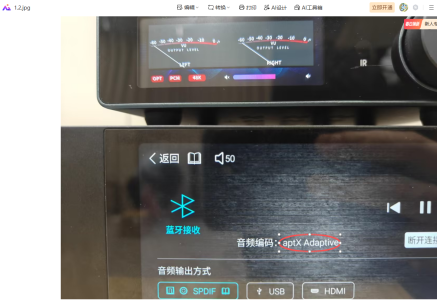
The DM100 supports aptX. I tested this using two DM100 units—one set as the Bluetooth transmitter and the other as the Bluetooth receiver. The protocol listed in the specifications is aptX, which is a feature supported by the QCC3083 Bluetooth chip.
 

Attachments

  • 1.4.png
    1.4.png
    428.4 KB · Views: 2
  • 1.3.png
    1.3.png
    564.2 KB · Views: 2
1. LDAC is supported for receiving, and APTX is supported for transmitting, provided the backend supports it.

2. You can add playlists through the album library; folders are used solely for file management.

3. What do you mean by “deleting unused categories”? If possible, please provide a screenshot or video.

4. If you find any Chinese terms on the English pages, please send us a screenshot, and we will fix it as soon as possible.

5. The FN custom buttons are located on the remote control.
1. It's a pity, but OK. You should have written this in the device description right away to avoid misunderstandings.
2. I understand. But may be you add this option in future updates. Many people sort their music by folders. Another moment it is impossible to select several albums to add them to playlist. To add them manully one by one would be very hard and slow.
3. I'va added screenshot from the app (selection of categories). It is necessary to add similar functionality to the DM100 interface.
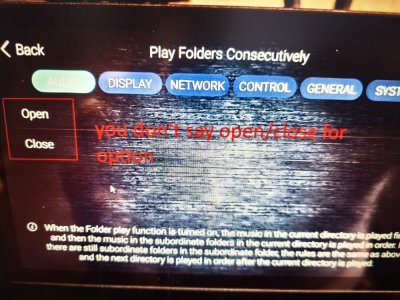
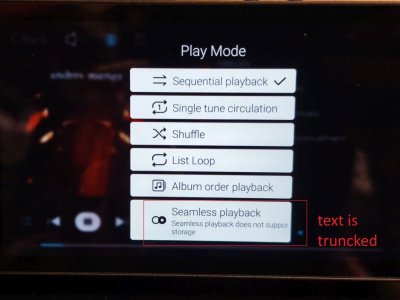
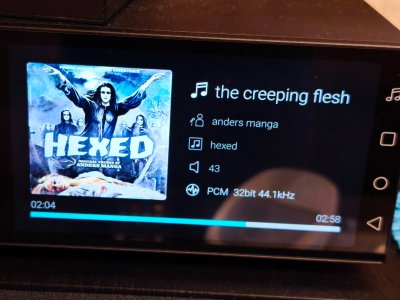
4. Added fotos with Chineese letters, wrong translation, trucked text in the interface
 

Attachments

  • selection of categories.jpg
    selection of categories.jpg
    140.7 KB · Views: 1
  • IMG_20260423_165124.jpg
    IMG_20260423_165124.jpg
    101 KB · Views: 1
  • IMG_20260423_165140.jpg
    IMG_20260423_165140.jpg
    96 KB · Views: 1
  • IMG_20260424_125751.jpg
    IMG_20260424_125751.jpg
    146.6 KB · Views: 1
  • IMG_20260424_174444.jpg
    IMG_20260424_174444.jpg
    63.1 KB · Views: 1
Regarding the Bluetooth auto-connect feature, the system requires a manual connection each time the device is turned on. This is because, when multiple devices are present, the system will not automatically connect to other devices without the user’s knowledge. Requiring a manual connection each time ensures that the user is aware of which device they are connecting to.

The DM100 supports aptX. I tested this using two DM100 units—one set as the Bluetooth transmitter and the other as the Bluetooth receiver. The protocol listed in the specifications is aptX, which is a feature supported by the QCC3083 Bluetooth chip.
I do not agree with your position on the automatic connection of bluetooth devices. This works fine on my phone (which is also made on Android), as well as on all other phones: as soon as I turn on any of the devices saved in the list, it automatically connects to my phone. It can be headphones, a wireless speaker, a car radio...
I don't understand why you can't do the same. It is very inconvenient to manually connect bluetooth devices.
 
Please also take a look at how the app interface looks on my phone: half the words are in English, half in Russian, and some words don't fit and are cut off. I think you should improve your app and add the ability to manually select the app language. Currently, the language is taken from the phone settings.
Also, I repeat: it is incorrect to use the words "open" or "close" when referring to enabling system settings. The correct words are "on," "off," or "enabled," or "disabled." You say "open" or "close" about valve? not option.
 

Attachments

  • Screenshot_2026-04-23-17-15-09-837_vip.mymei.remote.jpg
    Screenshot_2026-04-23-17-15-09-837_vip.mymei.remote.jpg
    146.2 KB · Views: 1
  • Screenshot_2026-04-25-12-54-32-945_vip.mymei.remote.jpg
    Screenshot_2026-04-25-12-54-32-945_vip.mymei.remote.jpg
    218.3 KB · Views: 1
  • selection of categories.jpg
    selection of categories.jpg
    140.7 KB · Views: 1
And additional suggestion for you: may be you could add adiitional information from tags on one of this screens: year of the album, genre
 

Attachments

  • IMG_20260426_100003.jpg
    IMG_20260426_100003.jpg
    1 MB · Views: 1
  • IMG_20260426_134251.jpg
    IMG_20260426_134251.jpg
    954 KB · Views: 1
1. It's a pity, but OK. You should have written this in the device description right away to avoid misunderstandings.
2. I understand. But may be you add this option in future updates. Many people sort their music by folders. Another moment it is impossible to select several albums to add them to playlist. To add them manully one by one would be very hard and slow.
3. I'va added screenshot from the app (selection of categories). It is necessary to add similar functionality to the DM100 interface.
4. Added fotos with Chineese letters, wrong translation, trucked text in the interface
Thank you for bringing these issues to our attention. I will discuss them with our engineers. As you mentioned, we will address the Chinese labels in the album library and the mixed English and Russian text on the mobile interface as soon as possible.

We will fix the other issues in a future update, so please be patient.
 
I do not agree with your position on the automatic connection of bluetooth devices. This works fine on my phone (which is also made on Android), as well as on all other phones: as soon as I turn on any of the devices saved in the list, it automatically connects to my phone. It can be headphones, a wireless speaker, a car radio...
I don't understand why you can't do the same. It is very inconvenient to manually connect bluetooth devices.
Power Consumption vs. Stability: To prevent audio stuttering or excessive system load caused by Bluetooth automatically searching for and connecting to multiple devices during startup, the DM100 disables the “auto-reconnect on startup” feature.

Differences from smartphone design goals: While smartphones must remain connected at all times, the DM100 is centered around a fixed wired audio system, with Bluetooth serving as a supplementary input source. Consequently, its Bluetooth connection strategy is not designed to meet the standards of a “portable device.”

A workaround you can try: Instead of shutting down the device, put it to sleep. In this state, Bluetooth pairing information is retained, and the device will automatically reconnect upon waking up, providing an experience similar to that of a smartphone.
 
A workaround you can try: Instead of shutting down the device, put it to sleep. In this state, Bluetooth pairing information is retained, and the device will automatically reconnect upon waking up, providing an experience similar to that of a smartphone.
That doesn't work for me. As soon as I turn off my headphones, they are disconnected. And they don't connect automatically again. I've tryed the same with my Bluetooth speakers Edifier G2000. They also don't connect automatically after disconnection. See attached video: https://disk.yandex.ru/i/Iszsmj71kJT4Ww

Dm100 doen't save the list of devices, that it was paired to, for fast connection. You have to start search each time.

Also control buttons on my headphones don't work. I cannot stop/resume playback from them, etc

A repeat again: may be bluetooth connection is not the high priority for this device, but I bought it to be the center of my media system, witch includes also bt headphones, and bt speakers. But in current realization the user experiece for using DM100 with bt devices is awfull. I even think to buy an external bt adapter to it. But the question is: why a bought DM100, if it doesn't meet half of my user cases?
 
Last edited:
That doesn't work for me. As soon as I turn off my headphones, they are disconnected. And they don't connect automatically again. I've tryed the same with my Bluetooth speakers Edifier G2000. They also don't connect automatically after disconnection. See attached video: https://disk.yandex.ru/i/Iszsmj71kJT4Ww

Dm100 doen't save the list of devices, that it was paired to, for fast connection. You have to start search each time.

Also control buttons on my headphones don't work. I cannot stop/resume playback from them, etc

A repeat again: may be bluetooth connection is not the high priority for this device, but I bought it to be the center of my media system, witch includes also bt headphones, and bt speakers. But in current realization the user experiece for using DM100 with bt devices is awfull. I even think to buy an external bt adapter to it. But the question is: why a bought DM100, if it doesn't meet half of my user cases?
Please do not delete the pairing from the DM100. If you leave the device powered on, the headphones will automatically connect whenever you turn them on.

Please watch the video: https://qr.bmwaz.cn/vmini?c=CuBsFB

In the video, the headphones are already paired, but the pairing information has not been deleted from the DM100. When I turn on the headphones, you can see a white light flashing—this indicates the pairing signal. Once the white light turns steady, the headphones have automatically connected to the DM100.

Note: Do not delete your headphones’ pairing information from the DM100. As long as you do not turn off or restart the DM100, the headphones will automatically connect whenever they are within Bluetooth range.
 
Please do not delete the pairing from the DM100. If you leave the device powered on, the headphones will automatically connect whenever you turn them on.

Please watch the video: https://qr.bmwaz.cn/vmini?c=CuBsFB

In the video, the headphones are already paired, but the pairing information has not been deleted from the DM100. When I turn on the headphones, you can see a white light flashing—this indicates the pairing signal. Once the white light turns steady, the headphones have automatically connected to the DM100.

Note: Do not delete your headphones’ pairing information from the DM100. As long as you do not turn off or restart the DM100, the headphones will automatically connect whenever they are within Bluetooth range.
Have you seen the video, I have provided? I have not deleted any connection. I've just put my headphones to the case, and they disconnected from DM100. After that I have to connect it manually.
The same case with Edifier G2000. I've just powered them off for a minute, and turned on again. After that I have to press Connect again.
 
Have you seen the video, I have provided? I have not deleted any connection. I've just put my headphones to the case, and they disconnected from DM100. After that I have to connect it manually.
The same case with Edifier G2000. I've just powered them off for a minute, and turned on again. After that I have to press Connect again.
I watched your video and understand your situation. I just tested another pair of headphones: from pairing to powering off and then pairing again, the DM100 displays “No devices connected” after the headphones are turned off, but as soon as the headphones are turned on, they automatically reconnect.

You can watch my verification video here: https://qr.bmwaz.cn/vmini?c=bCqVx9

I suggest you try testing with a different pair of headphones. I’ve tested multiple DM100 units and haven’t encountered the issue you described. I also recommend disconnecting any DACs, external optical drives, or memory devices—leave only the power cable connected—and try again. I’ll do my best to help you identify the source of the problem.
 
You can watch my verification video here: https://qr.bmwaz.cn/vmini?c=bCqVx9
I'd like to have such behaviour, but I don't. My headphones are Soundcore Liberty 4 NC. I've tried Edifier G2000 speakers, they behave the same way.
I've also tried with onedio fusion A70 headphones. Their behaviour is more mysterious: at first they connected to DM100 and mobile phone at the same time. They were playing music from DM100, but DM100 didn't show, that anything was connected to it all and couldnt find any available devices. Then I reconnected them just to DM100 and they behaved like my soundcore headphones (didn't recconect automatically after power off and on). On the 3d time they behaved like on your first video (after power off they showed to be still connectted to DM100, and automatically start playing after power on again)

I also recommend disconnecting any DACs, external optical drives, or memory devices—leave only the power cable connected—and try again.
Ok I'll try it
 
I'd like to have such behaviour, but I don't. My headphones are Soundcore Liberty 4 NC. I've tried Edifier G2000 speakers, they behave the same way.
I've also tried with onedio fusion A70 headphones. Their behaviour is more mysterious: at first they connected to DM100 and mobile phone at the same time. They were playing music from DM100, but DM100 didn't show, that anything was connected to it all and couldnt find any available devices. Then I reconnected them just to DM100 and they behaved like my soundcore headphones (didn't recconect automatically after power off and on). On the 3d time they behaved like on your first video (after power off they showed to be still connectted to DM100, and automatically start playing after power on again)


Ok I'll try it
It’s normal for the connection to establish automatically on your third attempt. I’ll continue testing with other headphone devices to see if I can reproduce the issue you described. I’ll be in touch if there are any updates. If you have any other questions, please feel free to reach out to us at any time.
 
1. I've tried disconnecting all cables except the power cable. This didn't help.

2. But I seem to have found a pattern: my headphones have settings in their app called "Priority Connection Quality," which makes them attempt to connect via LDAC whenever possible (if not pod\ssible? they connect SBC of course), and "Connect to Two Devices Simultaneously". These options were enabled (although headphones were connected in SBC codec, and no other devices were connected to the headphones). After I turned this settings off, the behavior returned to what I saw in your video: the headphones reconnect after disconnecting, and after the third try, they stay connected, even after I turn them off.

3. But another bug appeared: at a certain point, the DM100 stopped finding nearby Bluetooth devices (even though they were in pairing mode), and the "Update" button disappeared after one try of search. Only rebooting the DM100 helped. It is not the first time, I've encountered this issue

4. And there is incorrect translation on this screen: when searching bluetooth device there is inscription "fresh". It should be "Refresh" instead.
 
1. I've tried disconnecting all cables except the power cable. This didn't help.

2. But I seem to have found a pattern: my headphones have settings in their app called "Priority Connection Quality," which makes them attempt to connect via LDAC whenever possible (if not pod\ssible? they connect SBC of course), and "Connect to Two Devices Simultaneously". These options were enabled (although headphones were connected in SBC codec, and no other devices were connected to the headphones). After I turned this settings off, the behavior returned to what I saw in your video: the headphones reconnect after disconnecting, and after the third try, they stay connected, even after I turn them off.

3. But another bug appeared: at a certain point, the DM100 stopped finding nearby Bluetooth devices (even though they were in pairing mode), and the "Update" button disappeared after one try of search. Only rebooting the DM100 helped. It is not the first time, I've encountered this issue

4. And there is incorrect translation on this screen: when searching bluetooth device there is inscription "fresh". It should be "Refresh" instead.
Okay, I’ve noted down the third issue you mentioned, and I’ll also pass on the translation issue to the engineers.
 
Back
Top