

Normcore Greg
New member
DISCLAIMER: This review originally appeared on LoudTakes.com and I am the author.
A friend recently asked me what he could do to improve the sound from his computer when listening to music on headphones. My answer was obvious — get an external DAC and headphone amp. His follow-up was, predictably, “what is that and how much is it going to cost me?” So this video, and this companion post, is what I told him: what a DAC actually does, why an external one usually beats the chip in your phone or PC, and which unit he ended up buying for under a hundred bucks.
A DAC — digital-to-analog converter — is a circuit, usually packed into a single chip, that turns the zeros and ones flying out of your phone or computer into the analog signal that drives your headphones or speakers. Anything with an analog output already has a built-in DAC: your laptop, your phone, those tiny USB-C dongles. In theory the same bits should always sound the same after conversion. In practice they don’t, because the DAC inside your laptop is a low-priority part fighting for board space and power against a hundred other things. An external box like the DAC-A7 is allowed to be a DAC first, and that single decision is most of why it sounds better.
The same logic applies to the headphone amplifier. Your computer has one — it has to, otherwise nothing would come out of the 3.5 mm jack — but it’s a tiny low-power thing crammed into a corner of the motherboard. A dedicated unit like the A7 has more current to give, lower noise, and the headroom to stay clean as you push it. If you want the longer version of how this works, my DAC explainer and the impedance primer on this site cover the basics.
My friend set a hard ceiling at $100. That immediately killed the two units I was about to start with — the Fosi Audio ZH3 sits at $200 and the Fiio K11 R2R at $175. After a few iterations we ended up at the Aiyima DAC-A7, a recently launched desktop unit that lists at $79. At that price it’s hard to beat on value, and the spec sheet looked too rich for the money: an ESS Sabre ES9038Q2M DAC, a Texas Instruments TPA6120A2 headphone amp, four OPA1612 op-amps, and a Qualcomm QCC3084 Bluetooth 5.4 chip with full LDAC support.
Those op-amps are socketed too, which is the kind of thing that quietly delights tinkerers — you can swap them out later and play with the unit’s voicing the same way you’d roll tubes in a hybrid amp. Stock, though, the A7 already measures very well across the board: SNR over 120 dB, THD+N below 0.0003%, and a frequency response that’s flat within ±0.3 dB across the audible band. More on those measurements further down.
The A7 is small enough that it disappears on a desk, but it doesn’t feel like a toy. The case, front plate and back plate are all aluminum, and four silicon feet on the bottom keep the unit planted and stop it from scratching whatever it’s sitting on.
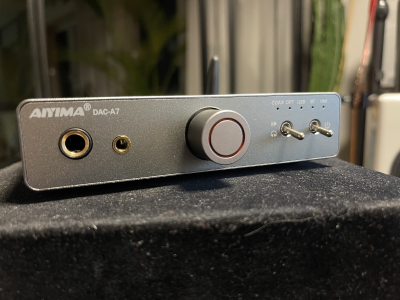
The volume knob is the centrepiece of the front panel. It’s plastic and turns continuously rather than having end-stops, but Aiyima have given it haptic detents every few degrees, so it has the precise, clicky feel of an encoder rather than a flimsy potentiometer. The red ring around it lights up when the unit is on. To the left of the knob are the two headphone outputs — 3.5 mm and 6.35 mm — and to the right are two metal rocker switches that look like something off the cockpit of a small aircraft. One is a power switch, the other toggles output between the headphones and the rear RCA line-outs. That second switch is what makes this little box double as a preamp: flick it over and you can drive a pair of active speakers, or feed an external power amp and a passive setup, without unplugging anything.
Above the switches are five status LEDs — COAX, OPT, USB, BT and VMI — that show you which input is currently selected and whether the volume is at minimum or maximum.
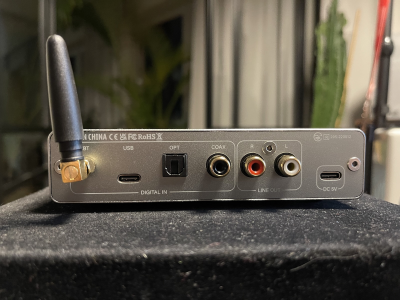
The rear panel is busier than you’d expect for a unit this small. From left to right: a detachable Bluetooth antenna; a USB-C input for your computer; optical and coaxial S/PDIF inputs (for a TV, console, or streamer); a pair of unbalanced RCA line-outs; and a separate USB-C socket for power. Aiyima don’t include a power adapter — any standard USB-C charger that puts out 5 V will run it, and you almost certainly already have several in a drawer.
Through USB, optical or coaxial the A7 will accept up to 24-bit / 192 kHz PCM. Over Bluetooth it caps at 24-bit / 96 kHz, which is what LDAC tops out at anyway. The QCC3084 also handles aptX-HD, aptX, AAC and SBC, so whatever phone or tablet you’re streaming from, you’ll get the best codec it supports without fiddling.
Unless you’ve already dropped serious money on a discrete sound card, the DAC-A7 will be a very obvious upgrade over your computer’s onboard audio. With 1500 mW into 32 Ω it’s powerful enough to drive any sensible pair of headphones to uncomfortable levels — Aiyima quote 16 to 600 Ω as the supported range, and that’s accurate.
I tested it with what’s currently sitting on my desk: my old workhorse Bose QuietComfort 25 closed-backs, a handful of IEMs in the £50–£200 range, my HiFiMan Sundaras, and the Verum 2 planars I picked up recently. Everything was driven cleanly and to plenty-loud. I won’t pretend the A7 squeezes the absolute last drop of refinement out of the Sundaras or the Verum 2s — for that you need to spend two or three times more — but it gets you a long way there, and at $79 the value-for-money calculus is silly.
The character is on the slightly clinical, neutral-cool side. If you’re already pairing it with bright headphones — some of the older Beyerdynamic stuff, or certain V-shaped IEMs — you may find longer sessions a touch fatiguing. Bass is tight and well-defined but not artificially weighted; you can hear that more expensive amps would push the low end with more authority, but you have to actually A/B them to notice. For a single $79 box doing DAC, headphone amp and preamp duty, that’s a non-issue.
If you want the deep dive on what these numbers mean, my Audiopaedia entries on SNR, THD and frequency response will get you there. The short version: at this price you simply do not see numbers like these. They’re not flagship-DAC territory, but they’re well past the point where the chips themselves stop being the bottleneck.
My friend has been living with the DAC-A7 on his desk for over a month now and is genuinely thrilled. He says the difference compared to his laptop’s onboard output is night and day — and given it’s his first dedicated DAC and headphone amp, I believe him completely. I remember my own first encounter with a real external DAC; that was the moment I felt I’d crossed into the hi-fi world. I’d love to be able to feel that for the first time again, but the law of diminishing returns is brutal: every upgrade I make to my main rig now is incremental at best.
If you’re building a desktop setup from scratch, want one box that handles headphones and active speakers, and you’re not ready to drop two or three hundred dollars yet — the DAC-A7 is the one I’d point you at.
A friend recently asked me what he could do to improve the sound from his computer when listening to music on headphones. My answer was obvious — get an external DAC and headphone amp. His follow-up was, predictably, “what is that and how much is it going to cost me?” So this video, and this companion post, is what I told him: what a DAC actually does, why an external one usually beats the chip in your phone or PC, and which unit he ended up buying for under a hundred bucks.
A DAC — digital-to-analog converter — is a circuit, usually packed into a single chip, that turns the zeros and ones flying out of your phone or computer into the analog signal that drives your headphones or speakers. Anything with an analog output already has a built-in DAC: your laptop, your phone, those tiny USB-C dongles. In theory the same bits should always sound the same after conversion. In practice they don’t, because the DAC inside your laptop is a low-priority part fighting for board space and power against a hundred other things. An external box like the DAC-A7 is allowed to be a DAC first, and that single decision is most of why it sounds better.
The same logic applies to the headphone amplifier. Your computer has one — it has to, otherwise nothing would come out of the 3.5 mm jack — but it’s a tiny low-power thing crammed into a corner of the motherboard. A dedicated unit like the A7 has more current to give, lower noise, and the headroom to stay clean as you push it. If you want the longer version of how this works, my DAC explainer and the impedance primer on this site cover the basics.
My friend set a hard ceiling at $100. That immediately killed the two units I was about to start with — the Fosi Audio ZH3 sits at $200 and the Fiio K11 R2R at $175. After a few iterations we ended up at the Aiyima DAC-A7, a recently launched desktop unit that lists at $79. At that price it’s hard to beat on value, and the spec sheet looked too rich for the money: an ESS Sabre ES9038Q2M DAC, a Texas Instruments TPA6120A2 headphone amp, four OPA1612 op-amps, and a Qualcomm QCC3084 Bluetooth 5.4 chip with full LDAC support.
Those op-amps are socketed too, which is the kind of thing that quietly delights tinkerers — you can swap them out later and play with the unit’s voicing the same way you’d roll tubes in a hybrid amp. Stock, though, the A7 already measures very well across the board: SNR over 120 dB, THD+N below 0.0003%, and a frequency response that’s flat within ±0.3 dB across the audible band. More on those measurements further down.
The A7 is small enough that it disappears on a desk, but it doesn’t feel like a toy. The case, front plate and back plate are all aluminum, and four silicon feet on the bottom keep the unit planted and stop it from scratching whatever it’s sitting on.
The volume knob is the centrepiece of the front panel. It’s plastic and turns continuously rather than having end-stops, but Aiyima have given it haptic detents every few degrees, so it has the precise, clicky feel of an encoder rather than a flimsy potentiometer. The red ring around it lights up when the unit is on. To the left of the knob are the two headphone outputs — 3.5 mm and 6.35 mm — and to the right are two metal rocker switches that look like something off the cockpit of a small aircraft. One is a power switch, the other toggles output between the headphones and the rear RCA line-outs. That second switch is what makes this little box double as a preamp: flick it over and you can drive a pair of active speakers, or feed an external power amp and a passive setup, without unplugging anything.
Above the switches are five status LEDs — COAX, OPT, USB, BT and VMI — that show you which input is currently selected and whether the volume is at minimum or maximum.
The rear panel is busier than you’d expect for a unit this small. From left to right: a detachable Bluetooth antenna; a USB-C input for your computer; optical and coaxial S/PDIF inputs (for a TV, console, or streamer); a pair of unbalanced RCA line-outs; and a separate USB-C socket for power. Aiyima don’t include a power adapter — any standard USB-C charger that puts out 5 V will run it, and you almost certainly already have several in a drawer.
Through USB, optical or coaxial the A7 will accept up to 24-bit / 192 kHz PCM. Over Bluetooth it caps at 24-bit / 96 kHz, which is what LDAC tops out at anyway. The QCC3084 also handles aptX-HD, aptX, AAC and SBC, so whatever phone or tablet you’re streaming from, you’ll get the best codec it supports without fiddling.
Unless you’ve already dropped serious money on a discrete sound card, the DAC-A7 will be a very obvious upgrade over your computer’s onboard audio. With 1500 mW into 32 Ω it’s powerful enough to drive any sensible pair of headphones to uncomfortable levels — Aiyima quote 16 to 600 Ω as the supported range, and that’s accurate.
I tested it with what’s currently sitting on my desk: my old workhorse Bose QuietComfort 25 closed-backs, a handful of IEMs in the £50–£200 range, my HiFiMan Sundaras, and the Verum 2 planars I picked up recently. Everything was driven cleanly and to plenty-loud. I won’t pretend the A7 squeezes the absolute last drop of refinement out of the Sundaras or the Verum 2s — for that you need to spend two or three times more — but it gets you a long way there, and at $79 the value-for-money calculus is silly.
The character is on the slightly clinical, neutral-cool side. If you’re already pairing it with bright headphones — some of the older Beyerdynamic stuff, or certain V-shaped IEMs — you may find longer sessions a touch fatiguing. Bass is tight and well-defined but not artificially weighted; you can hear that more expensive amps would push the low end with more authority, but you have to actually A/B them to notice. For a single $79 box doing DAC, headphone amp and preamp duty, that’s a non-issue.
If you want the deep dive on what these numbers mean, my Audiopaedia entries on SNR, THD and frequency response will get you there. The short version: at this price you simply do not see numbers like these. They’re not flagship-DAC territory, but they’re well past the point where the chips themselves stop being the bottleneck.
My friend has been living with the DAC-A7 on his desk for over a month now and is genuinely thrilled. He says the difference compared to his laptop’s onboard output is night and day — and given it’s his first dedicated DAC and headphone amp, I believe him completely. I remember my own first encounter with a real external DAC; that was the moment I felt I’d crossed into the hi-fi world. I’d love to be able to feel that for the first time again, but the law of diminishing returns is brutal: every upgrade I make to my main rig now is incremental at best.
If you’re building a desktop setup from scratch, want one box that handles headphones and active speakers, and you’re not ready to drop two or three hundred dollars yet — the DAC-A7 is the one I’d point you at.

